Viber connector
Connecting Viber to Bitrix24 Open Channels
Enable your clients to send you messages via Viber public accounts by connecting Viber to Bitrix24 Open Channels. You'll receive those messages directly inside your Bitrix24 account and your replies will be relayed back to Viber. All contacts and conversations will be saved inside your Bitrix24 CRM.
1) If you don’t have a Bitrix24 account yet:
Register your Bitrix24 account now
1) If you don’t have a Bitrix24 account yet:
Register your Bitrix24 account now
2) If you already have Bitrix24 account:
Go to Open Channels and create a new Viber channel. You’ll need to have Bitrix24 administrator rights to do that.
Select Viber connector and click "I've got the key".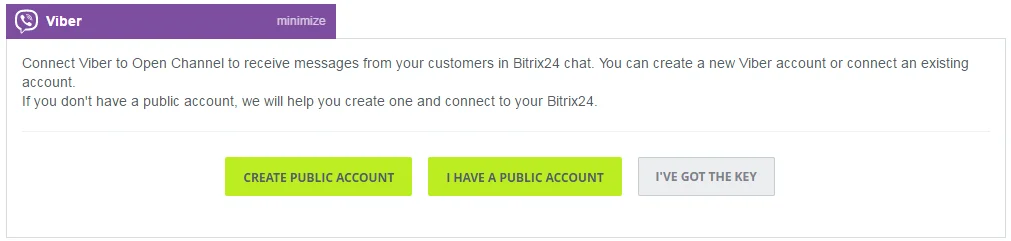 Copy the key from your Viber public account settings and paste it in an appropriate field in Bitrix24 Open Channels.
 Click "Save" to connect to Viber. If the connection has been established, you should see the following message:
 Make your clients aware of your Viber contact by adding this link to your mobile site.
If you are using the Bitrix24 website widget, the Viber icon will be displayed automatically among contact options.
Go to Open Channels and create a new Viber channel. You’ll need to have Bitrix24 administrator rights to do that.
Select Viber connector and click "I've got the key".
Copy the key from your Viber public account settings and paste it in an appropriate field in Bitrix24 Open Channels.
Click "Save" to connect to Viber. If the connection has been established, you should see the following message:
Make your clients aware of your Viber contact by adding this link to your mobile site.
If you are using the Bitrix24 website widget, the Viber icon will be displayed automatically among contact options.